⚠︎ Risk warning: leveraged derivatives on unregulated platforms — you can lose everything you deposit. Not investment advice.
The Aster Screen, Explained
Definitions verified against Aster's official docs on 2026-07-23. Screenshots are from our own account, taken the same day — the numbers in them were live then and will differ now.
Aster packs the most into one interface of any venue we cover: an order-book perps exchange, a spot market, prediction markets, copy-trading vaults, and its own blockchain — all under one nav bar. That breadth is powerful and genuinely overwhelming for a newbie, so this page walks it piece by piece, using screenshots from our own account. New to Aster? Start with the how-to-start guide; new to perps, read the perpetuals explainer first. We did the same tour for Hyperliquid, dYdX, and GMX.
The Trade Screen at a Glance
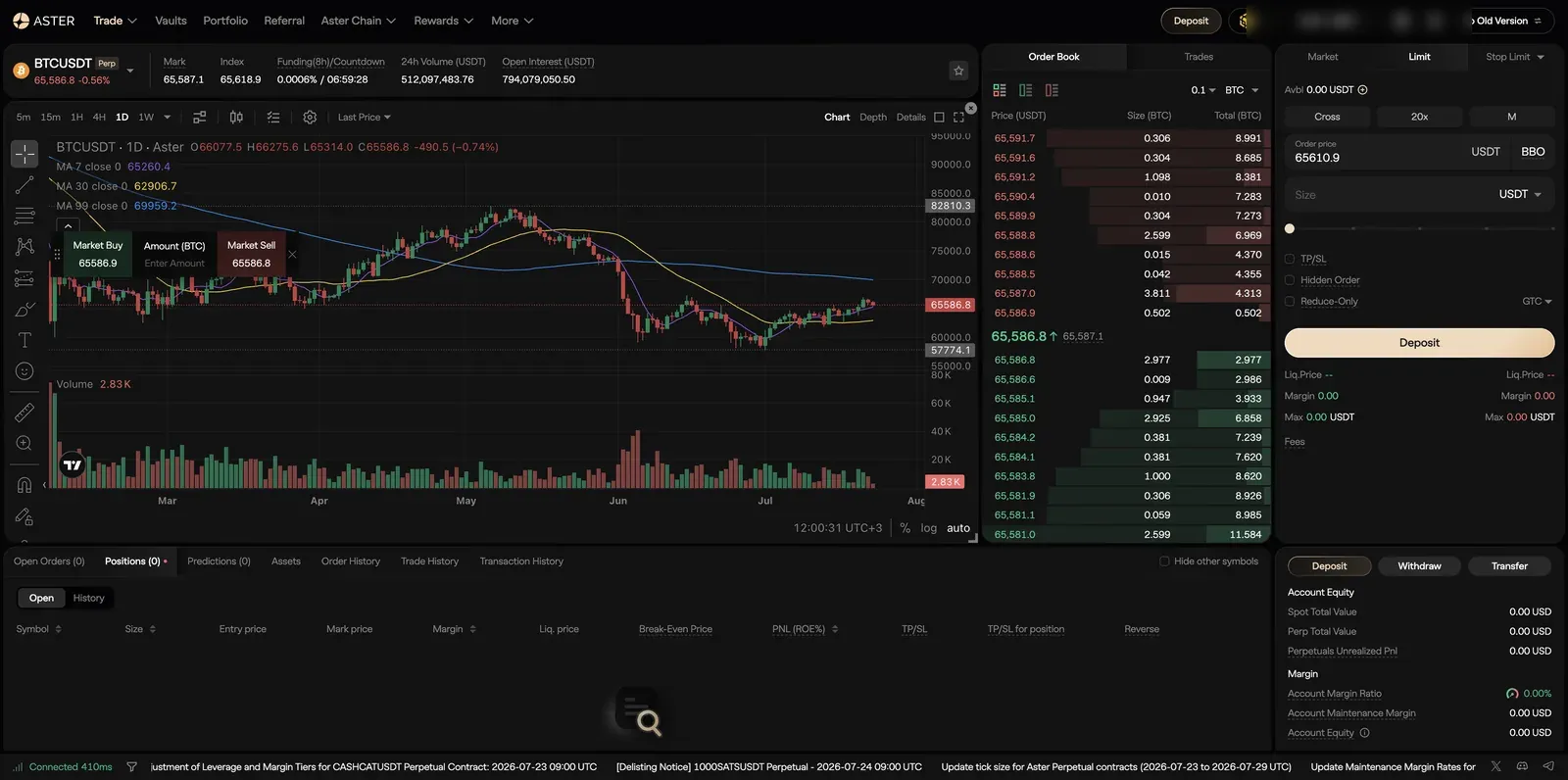
This is the Pro futures view — order book on the right, chart in the middle, order panel on the far right, positions along the bottom. The header shows Mark and Index prices and, notably, Funding (8h) / Countdown — per Aster's docs, funding runs on a default 8-hour interval and is peer-to-peer: "Aster does not charge or receive funding — it is a peer-to-peer transfer."
The Order Panel: A Lot of Order Types
Aster documents more order types than most venues. Beyond Market (immediate) and Limit (your price or better), the full set includes:
- Stop Limit / Stop Market — trigger orders that place a limit or market order once a stop price is hit.
- Trailing Stop — a stop that "follows the market as it moves in your favor" and fires if price reverses by a set percentage.
- Scaled Order — "places multiple limit orders simultaneously across a defined price range," laddering your size.
- TWAP — splits a large order into timed sub-orders to average the price over a period.
- Post Only — guarantees your order rests as a maker (rejected if it would match immediately).
- Chase Order — present in the interface; Aster's docs don't define it, so we won't assert its exact behavior — treat it as advanced and read Aster's own description before using it.
The checkboxes matter too: TP/SL attaches take-profit and stop-loss exit levels; Reduce-Only, per the docs, "guarantees that your order will never open or increase a position — it can only reduce or fully close" (worth using on exits); and Hidden Order "allows traders to place a limit order without revealing any information about its size or presence to the public order book" — a stealth/iceberg order, not a separate venue. The BBO button on the price field "places a limit order at the best bid or ask price."
Margin Mode, Leverage, and Asset Mode
Clicking the Cross label opens the margin-mode dialog — per the docs, cross margin "is shared across all open positions," while isolated margin "is applied to a single position only," and the switch "only applies to the selected contract." Clicking the leverage pill (the "20×") opens a slider. Here's a verified number worth knowing: on the Pro order book, BTCUSDT tops out at 200x (some symbols like HYPE go higher) — the interface itself warns that "selecting higher leverage increases your chances of liquidation." Treat those caps as hazard signs, not targets.
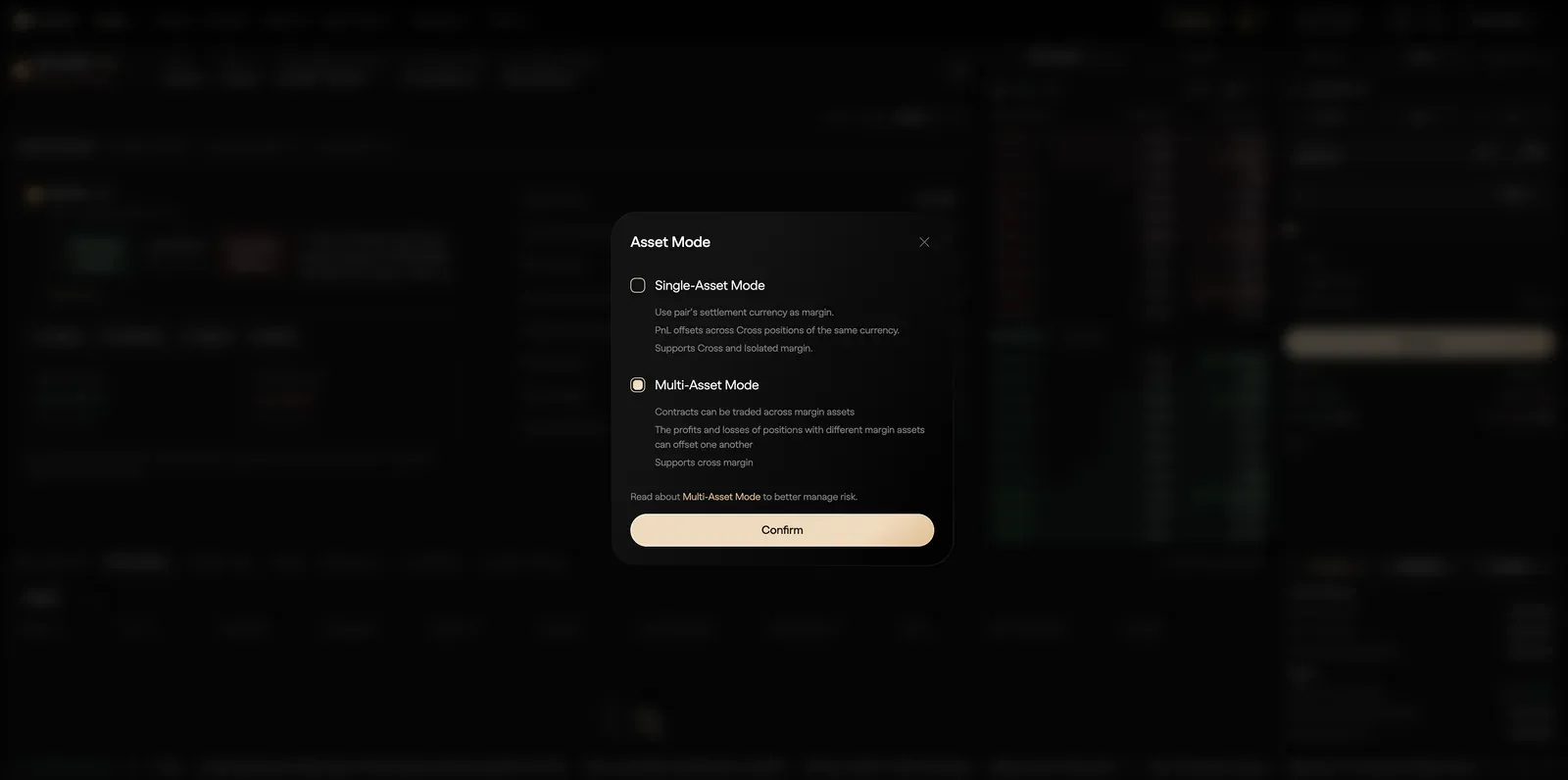
Aster also has an Asset Mode setting most venues don't: Single-Asset (your margin is the pair's settlement currency, PnL offsets only within the same currency) versus Multi-Asset (different margin assets can offset each other's PnL). Single-Asset is the simpler mental model for a beginner — one collateral currency, one clear risk picture.
USDT vs USD1 Perps: Two Families
Aster runs two perp families, and which one you trade changes your fee. Per the verified fee schedule: USDT-margined perps are 0% maker / 0.04% taker; USD1-margined perps are 0% maker / but only 0.005% taker — dramatically cheaper on the taker side. USD1 is a separate stablecoin Aster accepts as margin; the practical takeaway is that if a market is offered in a USD1 pair and you hold USD1, the taker fee is far lower. Paying fees in the ASTER token adds a further 5% discount. Our Aster fees breakdown has the full picture; the maker-heavy trader pays nothing either way.
The Account Equity Panel
Bottom-right of the trade screen tracks your account: Account Equity, Spot Total Value, Perp Total Value, and Perpetuals Unrealized Pnl up top, then Account Margin Ratio and Account Maintenance Margin below. The margin ratio is the one to watch — per Aster's docs, "if your margin ratio hits 100%, your positions will be liquidated." Keep it low.
Spot Trading
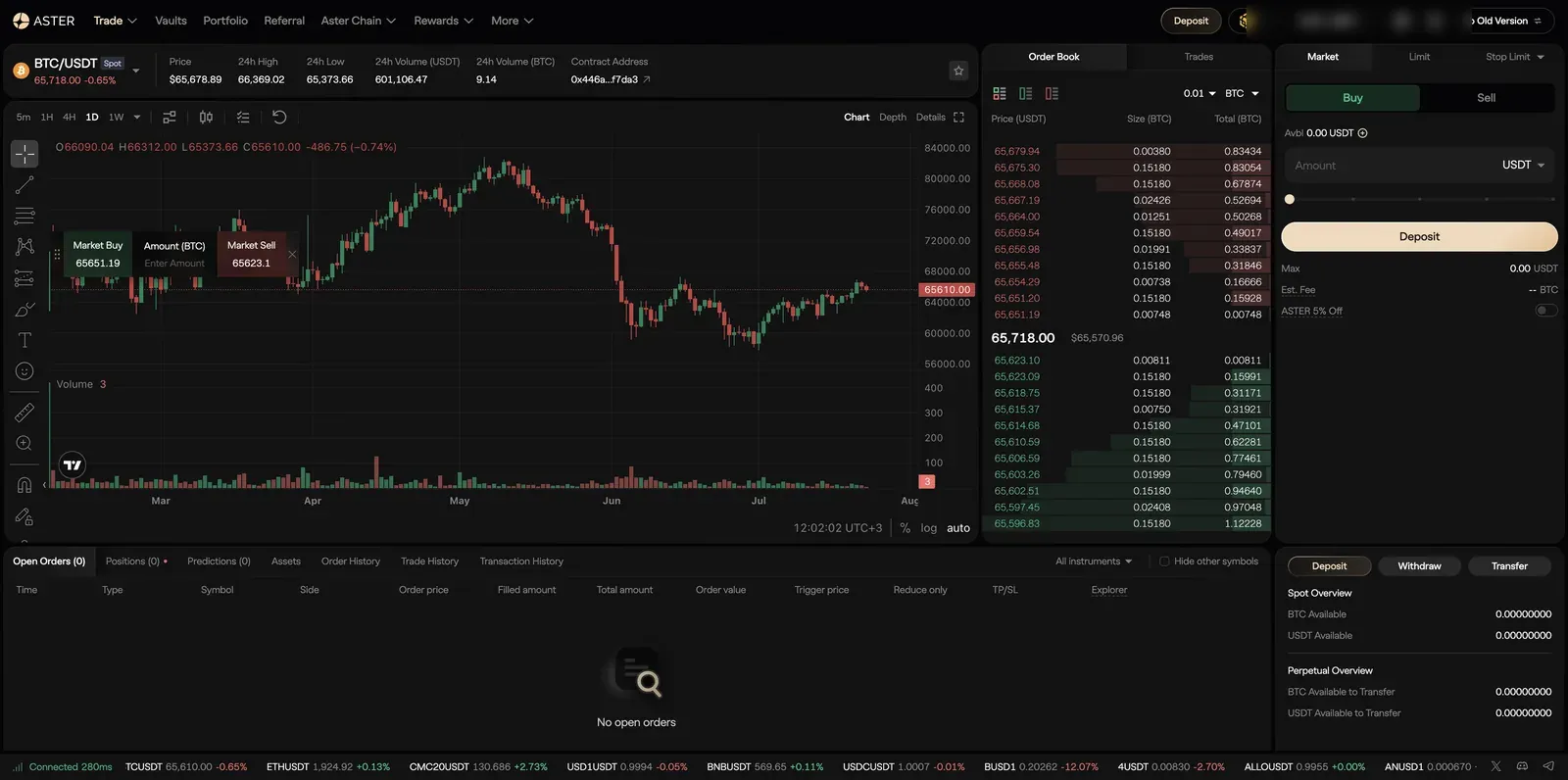
Switch the pair from "Perp" to "Spot" and the same Pro layout becomes a spot exchange — buy or sell the actual token rather than a leveraged contract. Note the ASTER 5% Off toggle in the order panel: paying fees in the ASTER token discounts them. Spot is the lower-risk corner of Aster (no leverage, no liquidation) — see our perp DEX guide for the spot-vs-perps distinction.
Predictions: Aster's Prediction Markets
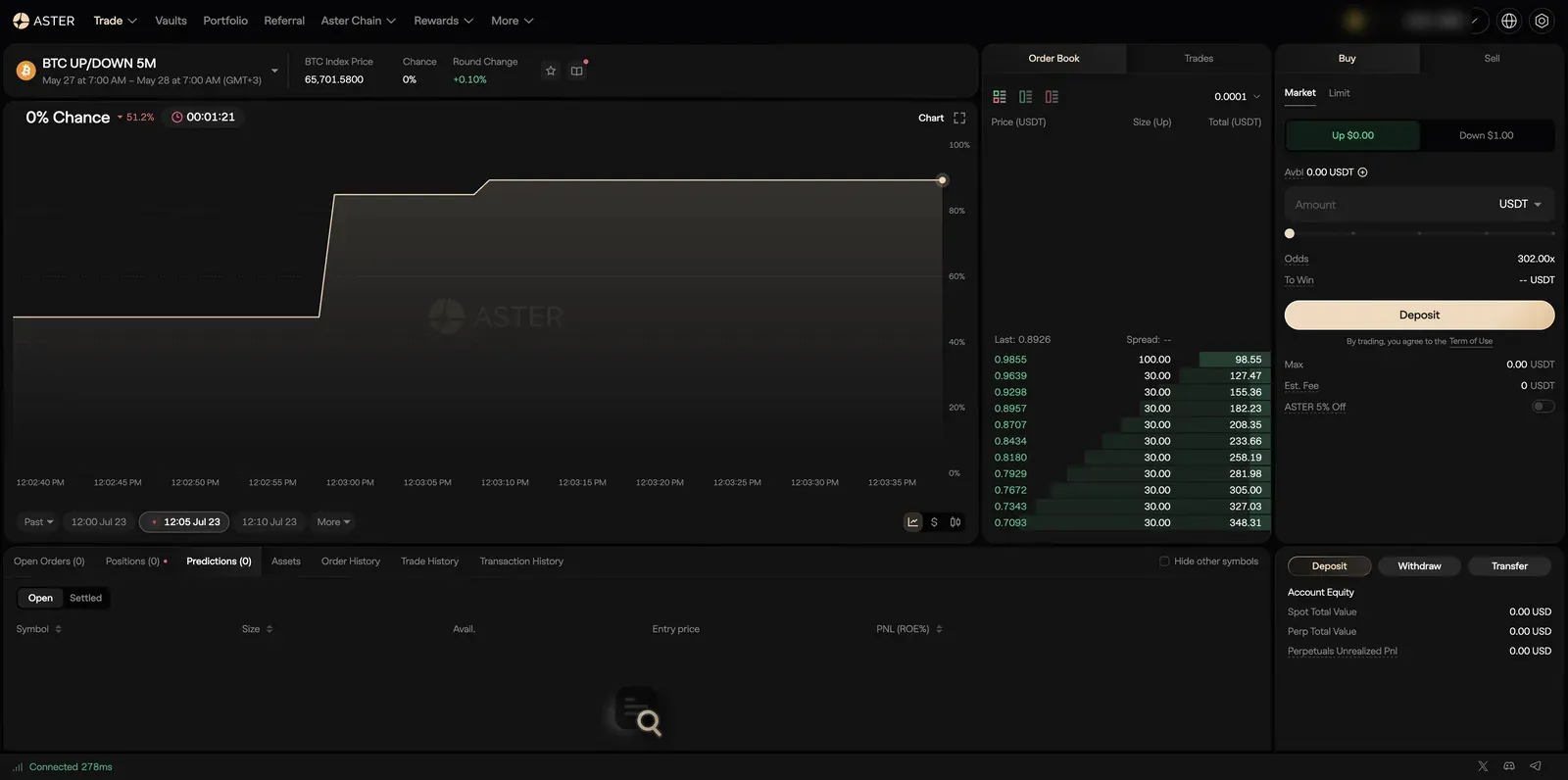
The Predictions tab is a genuinely different product. Per the docs, it "allow[s] users to trade on the outcome of future events" — you buy shares priced between $0.0001 and $0.9999 that represent an implied probability, and at settlement winning shares pay $1, losing shares $0. There are Price Markets (will an index be above/below a target at a set time — like the "BTC UP/DOWN 5M" shown) and Event Markets (Yes/No real-world outcomes). A 0.05% settlement fee applies "only to winning positions." It's closer to a prediction exchange than to perps, and the short-duration "5M" markets are effectively fast binary bets — treat them with that seriousness.
The "More" Menu — and the 1001x Honesty Note
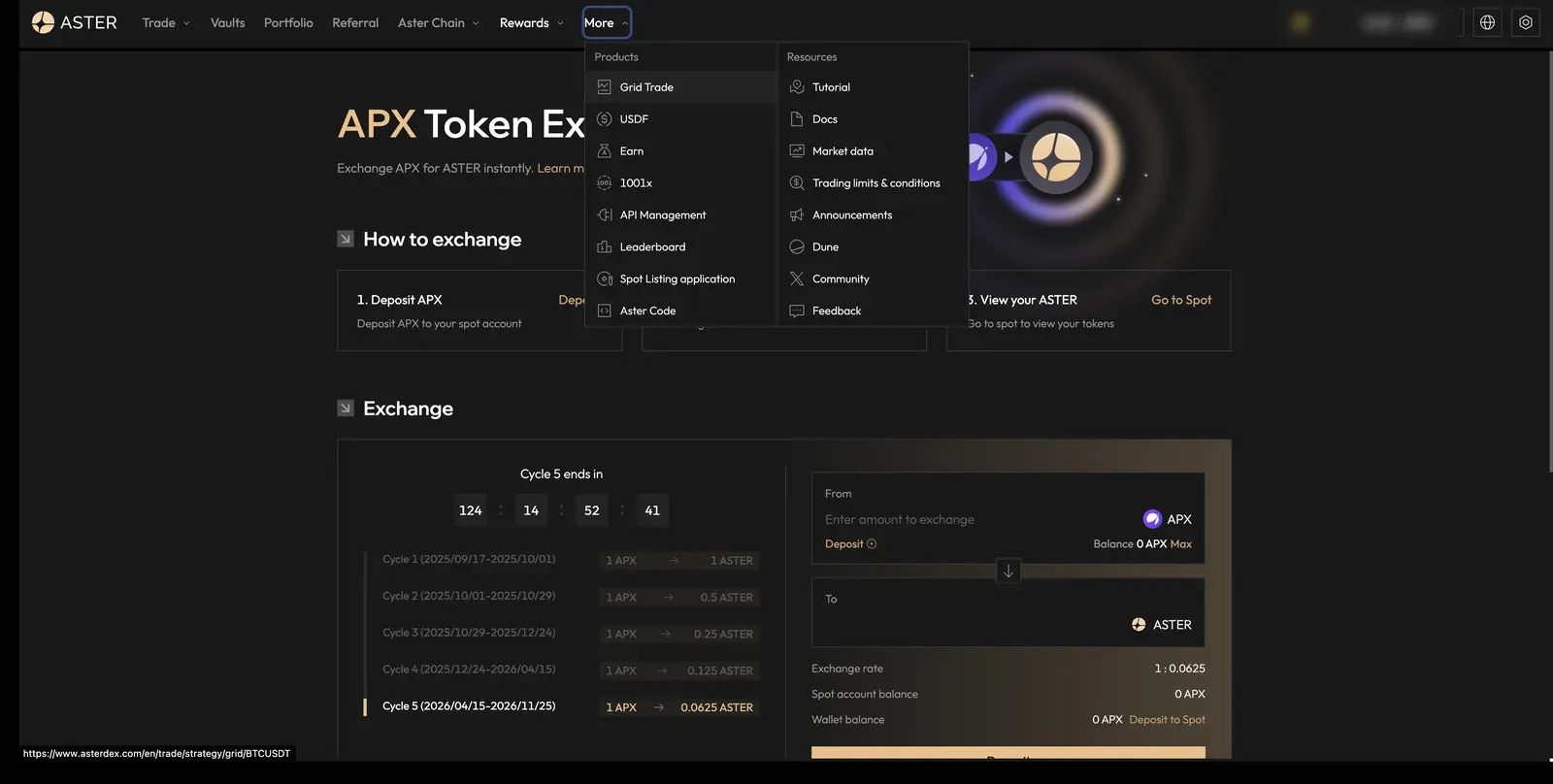
The More menu is where the rest of Aster lives: Grid Trade (automated grid strategies), Earn, an API, a Leaderboard, and 1001x. That last one deserves a clear warning, because it's easy to misread. 1001x is a separate product — Aster's "Simple" / Degen mode — not this Pro order-book interface. The Pro futures screen this page describes caps out at 200x on BTC; the 1001x figure applies only to that distinct high-leverage product on select pairs. Do not assume the screen you're on offers 1001x. And 1001x leverage means a fraction of a percent move against you is a total loss — it's about the most dangerous thing in retail crypto. We mention it factually and steer well clear of encouraging it. (The menu also links an APX→ASTER token exchange, a legacy conversion from Aster's earlier APX incarnation.)
Vaults, Aster Chain, and Rewards
Three more nav items round out the platform, each covered honestly:
- Vaults — copy-trading, not a liquidity pool. Per the docs, vaults "allow experienced traders to manage capital on behalf of investors"; you deposit and "receive a proportional ownership share," and "all profits and losses generated by the Vault are shared proportionally." That means you inherit the manager's results — wins and drawdowns alike — with a lock-up period and a manager performance fee (0–100%). It's delegated trading, framed as such in our earning guide.
- Aster Chain — Aster's own blockchain. Per the docs, "a high-performance, privacy-focused Layer 1 blockchain designed specifically for derivatives trading," using ZK-encrypted orders and stealth addresses. A distinctive piece of infrastructure, still early.
- Rewards — the airdrop machine. Per the docs, it's "your gateway to the $ASTER airdrop," combining trading points ("Rh Points") and a non-withdrawable collateral bonus. The detailed points mechanics and airdrop status are on our Aster points page.
Portfolio and Fee Tiers
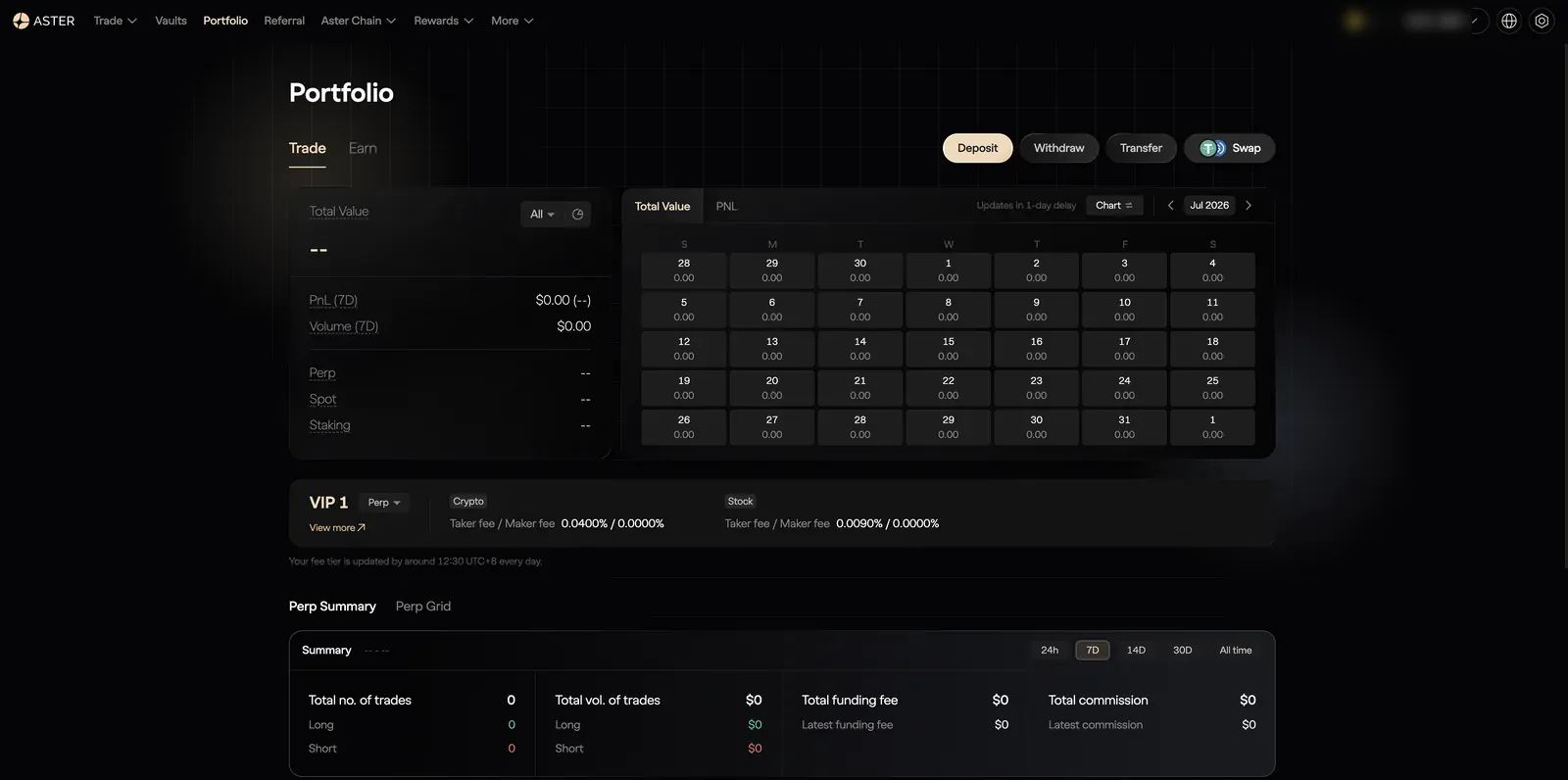
The Portfolio page is your account overview — value, daily PnL, and your VIP fee tier (the screenshot shows VIP 1: 0.04% taker on crypto). Fee tiers improve with volume, updated daily. It also surfaces a "Stock" fee row — Aster lists some equity-style markets alongside crypto perps.
The Stardust Points Page
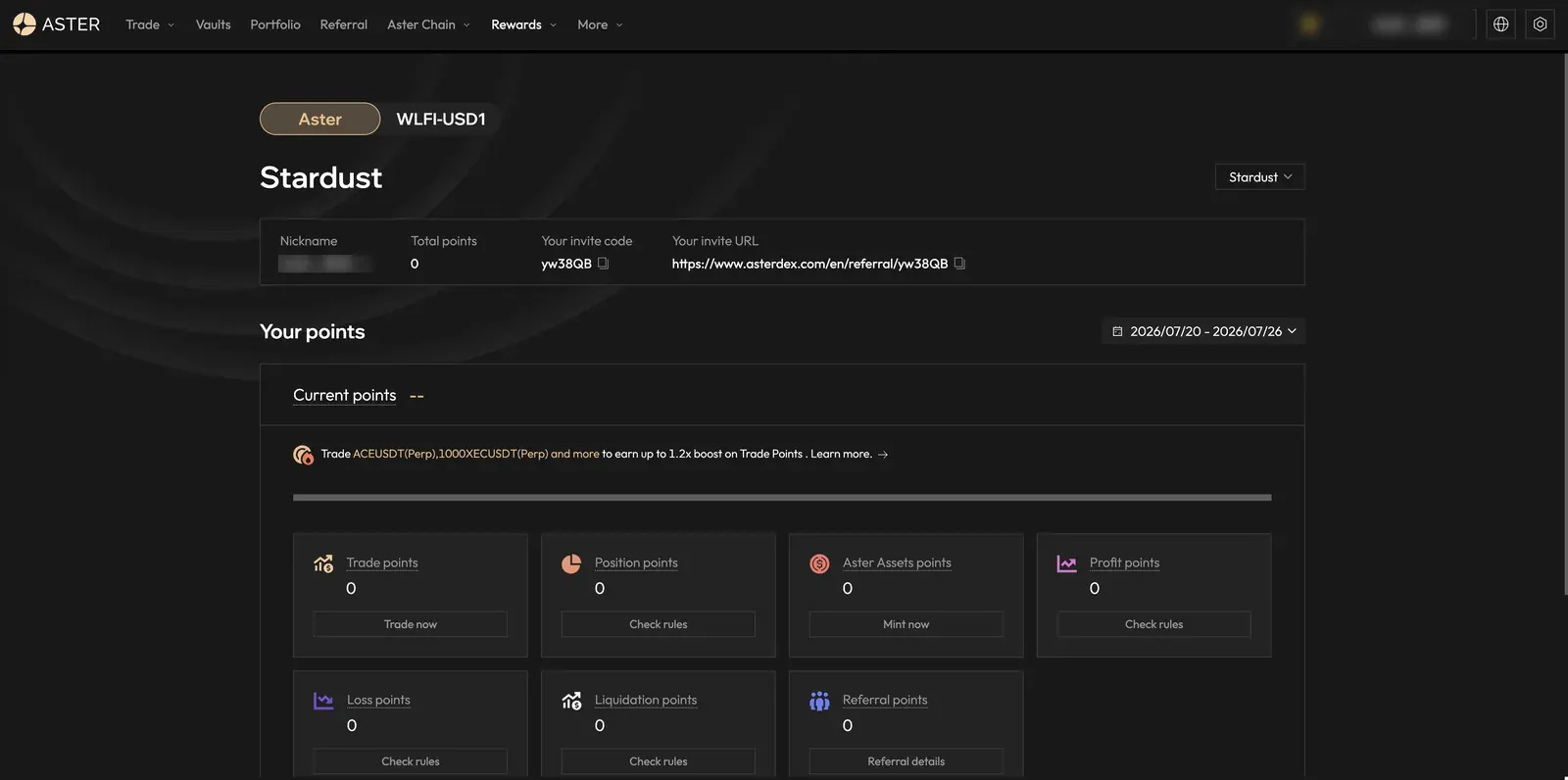
Under Rewards, the Stardust points page shows how points accrue — split across Trade, Position, Profit, Loss, Liquidation, and Referral categories, toward the $ASTER airdrop. The honest framing lives on our Aster points explainer and in the earning guide: points are a promise of unknown value, and churning volume purely to farm them can cost more in fees than the allocation is worth. Trade what you'd trade anyway; treat points as a rebate.
Frequently Asked Questions
Does the Aster trade screen let me use 1001x leverage?
No — not the Pro order-book interface. That caps at 200x on BTC. The "1001x" in the More menu is a separate Simple/Degen-mode product on select pairs. And 1001x is extraordinarily dangerous: a tiny adverse move wipes the position. We flag it factually and don't recommend it.
What's the difference between USDT and USD1 perps?
They're two contract families with different margin stablecoins and different taker fees — USDT perps at 0.04% taker, USD1 perps at just 0.005%, both 0% maker. If you hold USD1 and the market's offered as a USD1 pair, taking is much cheaper. See our fees page.
Is an Aster Vault a safe way to earn?
A vault is copy-trading: a manager trades your deposited capital and you share the results — including losses — minus a performance fee, with a lock-up. It's delegated directional trading, not a fixed yield. Understand the manager and the risk before depositing.
Open Aster (opens in a new tab)
This page contains affiliate links. Screenshots are of our own account and carry no compensation from Aster; values shown were live on the capture date and change constantly. See our methodology.